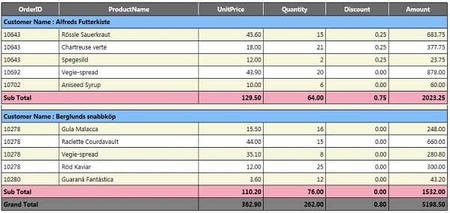
Hello Reader! In this post, we want to discuss GridView with subtotal and total in ASP.Net. Before we get started, if you want to know about how to export gridview data to excel, please go through the following article: Export GridView to excel with advanced features.
//Variable Declaration:

int iUPrice = 0;
int iTPrice = 0;
int iQty = 0;
int iTQty = 0;
int iDealer = 0;
int rowIndex = 1;

public static void MergeRows(GridView gridView)
{
    for (int rowIndex = gridView.Rows.Count - 2; rowIndex >= 0; rowIndex--)
    {
       GridViewRow row = gridView.Rows[rowIndex];
       GridViewRow previousRow = gridView.Rows[rowIndex + 1];

       for (int i = 0; i < 5; i++)
       {
        if (row.Cells[i].Text == previousRow.Cells[i].Text)
        {
           row.Cells[i].RowSpan = previousRow.Cells[i].RowSpan < 2 ? 2 :
           previousRow.Cells[i].RowSpan + 1;
           previousRow.Cells[i].Visible = false;
        }
      }
   }
}

protected void gvPartsInfo_RowDataBound(object sender, GridViewRowEventArgs e)
{
    if (e.Row.RowType == DataControlRowType.DataRow)
    {
       iDealer = Convert.ToInt32(DataBinder.Eval(e.Row.DataItem, "DealerID").ToString());
       int tmpTotal = Convert.ToInt32(DataBinder.Eval(e.Row.DataItem, "TotalPrice").ToString());
       iUPrice += tmpTotal;
       iTPrice += tmpTotal;

       int tmpQty = Convert.ToInt32(DataBinder.Eval(e.Row.DataItem, "Qty").ToString());
       iQty += tmpQty;
       iTQty += tmpQty;
    }

    if (e.Row.RowType == DataControlRowType.Footer)
    {
       ((Label)e.Row.FindControl("lblTotalPrice")).Text = iTPrice.ToString();
       ((Label)e.Row.FindControl("lblTotalQty")).Text = iTQty.ToString();
     }
}

protected void gvPartsInfo_RowCreated(object sender, GridViewRowEventArgs e)
{
     bool newRow = false;
     if ((iDealer > 0) && (DataBinder.Eval(e.Row.DataItem, "DealerID") != null))
     {
        if (iDealer != Convert.ToInt32(DataBinder.Eval(e.Row.DataItem, "DealerID").ToString()))
        newRow = true;
     }

     if ((iDealer > 0) && (DataBinder.Eval(e.Row.DataItem, "DealerID") == null))
     {
        newRow = true;
        rowIndex = 0;
     }

     if (newRow)
     {
         GridView GridView1 = (GridView)sender;
         GridViewRow NewTotalRow = new GridViewRow(0, 0, DataControlRowType.DataRow, DataControlRowState.Insert);
         NewTotalRow.Font.Bold = true;
         NewTotalRow.BackColor = System.Drawing.Color.Gray;
         NewTotalRow.ForeColor = System.Drawing.Color.White;

         TableCell HeaderCell = new TableCell();
         HeaderCell.Text = "Dealer Wise Sub Total";
         HeaderCell.HorizontalAlign = HorizontalAlign.Left;
         HeaderCell.VerticalAlign = VerticalAlign.Middle;
         HeaderCell.ColumnSpan = 8;
         NewTotalRow.Cells.Add(HeaderCell);

         HeaderCell = new TableCell();
         HeaderCell.HorizontalAlign = HorizontalAlign.Right;
         HeaderCell.VerticalAlign = VerticalAlign.Middle;
         HeaderCell.ColumnSpan = 1;
         HeaderCell.Text = iQty.ToString();
         NewTotalRow.Cells.Add(HeaderCell);

         HeaderCell = new TableCell();
         HeaderCell.HorizontalAlign = HorizontalAlign.Right;
         HeaderCell.VerticalAlign = VerticalAlign.Middle;
         HeaderCell.ColumnSpan = 2;
         HeaderCell.Text = iUPrice.ToString();
         NewTotalRow.Cells.Add(HeaderCell);
         GridView1.Controls[0].Controls.AddAt(e.Row.RowIndex + rowIndex, NewTotalRow);
         rowIndex++;
         iUPrice = 0;
         iQty = 0;
      }

      GridView gridView = (GridView)sender;
      MergeRows(gridView);
}
