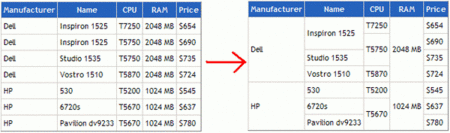
In this article, we want to discuss how to merge GridView with equal values. Before we get started, if you want to know about split with any delimited string, please go through the following article: Call JavaScript function from code behind in C#.
There are a lot of methods on the Internet to solve the problem of how to merge GridView rows if neighboring cells show equal values. My approach is not the first; however, I think, it is rather universal and very short – less than 20 lines of code.
public static void MergeRows(GridView gridView)
{
    for (int rowIndex = gridView.Rows.Count - 2; rowIndex >= 0; rowIndex--)
    {
        GridViewRow row = gridView.Rows[rowIndex];
        GridViewRow previousRow = gridView.Rows[rowIndex + 1];

        for (int i = 0; i < row.Cells.Count; i++)
        {
             if (row.Cells[i].Text == previousRow.Cells[i].Text)
             {
                 row.Cells[i].RowSpan = previousRow.Cells[i].RowSpan < 2 ? 2 : previousRow.Cells[i].RowSpan + 1;
                 previousRow.Cells[i].Visible = false;
             }
        }
    }
}
The last action is to add an OnPreRender the event handler for the GridView:
protected void gridView_PreRender(object sender, EventArgs e)
{
    MergeRows(gridView);
}
You can set your desired column number to merge by using this issue.
public static void MergeRows(GridView gridView, int ColNumber)
{
    for (int rowIndex = gridView.Rows.Count - 2; rowIndex >= 0; rowIndex--)
    {
        GridViewRow row = gridView.Rows[rowIndex];
        GridViewRow previousRow = gridView.Rows[rowIndex + 1];

        for (int i = 0; i < ColNumber; i++)
        {
             if (row.Cells[i].Text == previousRow.Cells[i].Text)
             {
                 row.Cells[i].RowSpan = previousRow.Cells[i].RowSpan < 2 ? 2 : previousRow.Cells[i].RowSpan + 1;
                 previousRow.Cells[i].Visible = false;
             }
        }
    }
}
gvConcernPerson.DataSource = dtMancom; gvConcernPerson.DataBind(); MergeRows(gvConcernPerson, 1);

Very Useful..!!
Very useful..Thankyou..!!