A Set in Python is an unordered collection of unique elements. Sets are mutable, but the elements must be immutable types. They are used to perform mathematical set operations like union, intersection, difference, etc.
Characteristics
Set is one of 4 built-in data types in Python used to store collections of data, the other 3 are List, Tuple, and Dictionary, all with different qualities and usage, with the following characteristics:
- No duplicate elements: If an attempt is made to add a duplicate item, the existing item remains unchanged.
- Unordered collection: Sets do not maintain any specific order of elements, and items cannot be accessed using indexes as in lists.
- Efficient operations: Sets use hashing internally, which enables fast search, insertion, and deletion, providing a significant advantage over lists for such operations.
- Mutable structure: Although the set itself can be modified by adding or removing elements, the individual elements must be immutable and cannot be altered directly once added.
Create a Default Set in Python
fruits = {"apple", "banana", "cherry"}
print(fruits)
This creates a set with three elements. Duplicate items are automatically removed.
Create an Empty Set
empty_set = set()
print(empty_set)
You must use set() to create an empty set. Using {} creates an empty dictionary instead.
Duplicate Items in a Set
numbers = {1, 2, 2, 3, 4}
print(numbers)
The output will be {1, 2, 3, 4} — duplicate 2 is removed automatically.
Add and Update Set Items in Python
Add Items to a Set in Python
colors = {"red", "blue"}
colors.add("green")
print(colors)
Use add() to insert a single element into a set.
Update Python Set
colors.update(["yellow", "blue", "purple"])
print(colors)
update() can add multiple elements at once. Duplicates are ignored.
Remove an Element from a Set
colors.remove("blue")
print(colors)
remove() deletes an element, but raises an error if the item is not found.
colors.discard("pink")
print(colors)
discard() removes an item if present; does nothing if the item is missing.
Built-in Functions with Set
my_set = {10, 20, 30}
print(len(my_set))      # Number of elements
print(max(my_set))      # Maximum value
print(min(my_set))      # Minimum value
print(sum(my_set))      # Sum of all elements
Sets support useful built-in functions like len(), max(), min(), and sum().
Iterate Over a Set in Python
for item in my_set:
    print(item)
You can loop through a set using a for loop. Order is not guaranteed.
Find Number of Set Elements
print("Number of items:", len(my_set))len() returns the total number of unique elements.
Python Set Operations: Union & Intersection
Union
a = {1, 2, 3}
b = {3, 4, 5}
print(a | b)
The | operator (or union() method) combines all unique elements from both sets.
Intersection
print(a & b)& returns only the common elements from both sets.
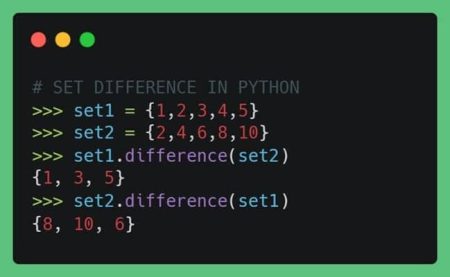
Difference between Two Sets
print(a - b)  # Items in a but not in b
print(b - a)  # Items in b but not in a
The the - operator finds items present in one set but not the other.
Set Symmetric Difference
print(a ^ b)^ returns elements present in either set but not in both (i.e., exclusive elements).
Check if Two Sets are Equal
x = {1, 2, 3}
y = {3, 2, 1}
print(x == y)
Set equality checks whether both sets contain the same elements, regardless of order.
Conclusion
Python sets are a powerful tool when you need to store unique elements and perform common mathematical operations. They are fast, memory-efficient, and perfect for tasks like deduplication, comparisons, and membership testing.
Whether you’re cleaning data, optimizing logic, or just need a lightweight collection with no duplicates, sets are your go-to structure!
