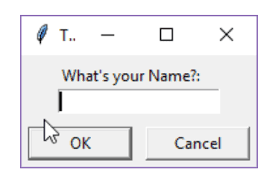
In this tutorial, we will create a user input dialog with python and prints it in the terminal, the purpose of this tutorial is to understand how to take the user input for the GUI application.
Tkinter Module
The Tkinter module (“Tk interface”) is the standard Python interface to the Tk GUI toolkit. Both Tk and Tkinter are available on most Unix platforms, as well as on Windows systems. (Tk itself is not part of Python; it is maintained at ActiveState.) The Tkinter package is shipped with Python as a standard package, so we don’t need to install anything to use it.
We will use the built-in Python package Tkinter which is implemented as a Python wrapper for the Tcl Interpreter embedded within the interpreter of Python.
Creating User Input Dialog With Tkinter
import tkinter as tk
from tkinter import dialog

main = tk.Tk()
main.withdraw()

u_input = dialog.askstring(title="Test", prompt="What's your Name?:") # The input dialog from user
print("Hello", u_input) # Check it out
Save the file you should see the following input dialog asking for your name. Enter your name here it should be printed in the terminal along with the message. Hello TechAid24
Explanation
- First, we are importing the Tkinter module, then we are creating a window in the
ROOTobject. - Next, we have the
withdraw()method which removes the window from the screen (without destroying it). - Later we are taking the user from the user using
askstring()a method that simply takes the string entered. - At the bottom, we printed out the Hello string along with the user input.
