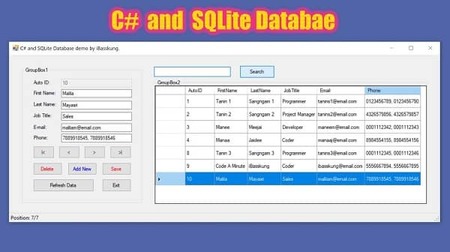
In this article, we want to discuss how to using SQLite with C# (C sharp). Before we get started, if you want to know about how to create a file copier, please go through the following article: Create File Copier with C#.
Adding a database to your application can be an easy way to store data and settings between sessions for your program, but it is not always feasible to use a server-based DBMS to store your database. SQLite is a small, fast, and reliable database that can be used without the end-user having to install anything extra (achieved by referencing a single .dll in your project).
There are a few things we as developers must do to get started using SQLite:
- Install the .NET provider for SQLite from Sourceforge.net
- Add a reference to System.Data.SQLite to your project (and mark the .dll to be copied locally to your project)
- Optionally Download a SQLite GUI Client and use it to design your DB (Feel free to code it by hand if that is your preference)
If the above section made sense to you, feel free to jump down to the section titled “Interacting with your Database”, otherwise keep reading!
Referencing System.Data.SQLite
After you have installed the .NET provider for SQLite, you need to make sure that your project can access the required .dll. In Visual Studio 2008, this can be done by selecting “Project -> Add Reference…” from the main menu bar. A window will pop up, and under the “.NET” tab, scroll down and find System.Data.SQLite.
Select it and click ok. It is now referenced in your project. The last thing we need to do is make sure Visual Studio copies the .dll for System.Data.SQLite to the project folder, which is necessary for SQLite to work without the provider. If the Solution Explorer window is not currently visible, open it by selecting “View -> Solution Explorer” from the main menu bar. Under the current project, click the + sign next to References to see a list of all currently referenced libraries.
Right-click the reference to System.Data.SQLite, and select “Properties”. Set the property “Copy Local” to true. You have now successfully referenced SQLite, and it can be added to any file by “using System.Data.SQLite;”.
Using the SQLite GUI Client
SQLite Administrator is a very straightforward Client, and I am not going to go into much detail about its use. I will however note a few things that were not immediately evident to me when I first used it.
- SQLite does not currently support foreign key constraints. Therefore SQLite Administrator does not have any way of linking tables via Foreign Key. That is certainly something to keep in mind.
- The box on the left-hand side is for viewing the current Database and all of its objects. If you see something you don’t want to see or don’t see something you want to see, the buttons at the top of the box are toggle switches for tables, views, triggers, indexes, and so on. Since there are no tooltips, you’ll just have to play around to figure out which is which function.
Interacting with your Database
Once the database is set up, it is time to begin reading from it and writing to it. In order to facilitate the interaction with the DB, I have written a helper class. It should be noted that a portion of this code is adapted from the sample code in this tutorial by Mike Duncan. The Methods GetDataTable(), ExecuteNonQuery(), and ExecuteScalar() are his code and not mine.
Using the SQLiteDatabase Helper Class
using System;
using System.Collections.Generic;
using System.Data;
using System.Data.SQLite;
using System.Windows.Forms;

class SQLiteDatabase
{
    String dbConnection;

/// <summary>
/// Default Constructor for SQLiteDatabase Class.
/// </summary>
    public SQLiteDatabase()
    {
        dbConnection = "Data Source=recipes.s3db";
    }

/// <summary>
/// Single Param Constructor for specifying the DB file.
/// </summary>
/// <param name="inputFile">The File containing the DB</param>
    public SQLiteDatabase(String inputFile)
    {
        dbConnection = String.Format("Data Source={0}", inputFile);
    }

/// <summary>
/// Single Param Constructor for specifying advanced connection options.
/// </summary>
/// <param name="connectionOpts">A dictionary containing all desired options and their values</param>
    public SQLiteDatabase(Dictionary<String, String> connectionOpts)
    {
        String str = "";
        foreach (KeyValuePair<String, String> row in connectionOpts)
        {
            str += String.Format("{0}={1}; ", row.Key, row.Value);
        }
        str = str.Trim().Substring(0, str.Length - 1);
        dbConnection = str;
    }

/// <summary>
/// Allows the programmer to run a query against the Database.
/// </summary>
/// <param name="sql">The SQL to run</param>
/// <returns>A DataTable containing the result set.</returns>
    public DataTable GetDataTable(string sql)
    {
        DataTable dt = new DataTable();
        try
        {
            SQLiteConnection cnn = new SQLiteConnection(dbConnection);
            cnn.Open();
            SQLiteCommand mycommand = new SQLiteCommand(cnn);
            mycommand.CommandText = sql;
            SQLiteDataReader reader = mycommand.ExecuteReader();
            dt.Load(reader);
            reader.Close();
            cnn.Close();
        }
        catch (Exception e)
        {
            throw new Exception(e.Message);
        }
        return dt;
    }

/// <summary>
/// Allows the programmer to interact with the database for purposes other than a query.
/// </summary>
/// <param name="sql">The SQL to be run.</param>
/// <returns>An Integer containing the number of rows updated.</returns>
    public int ExecuteNonQuery(string sql)
    {
        SQLiteConnection cnn = new SQLiteConnection(dbConnection);
        cnn.Open();
        SQLiteCommand mycommand = new SQLiteCommand(cnn);
        mycommand.CommandText = sql;
        int rowsUpdated = mycommand.ExecuteNonQuery();
        cnn.Close();
        return rowsUpdated;
    }

/// <summary>
/// Allows the programmer to retrieve single items from the DB.
/// </summary>
/// <param name="sql">The query to run.</param>
/// <returns>A string.</returns>
    public string ExecuteScalar(string sql)
    {
        SQLiteConnection cnn = new SQLiteConnection(dbConnection);
        cnn.Open();
        SQLiteCommand mycommand = new SQLiteCommand(cnn);
        mycommand.CommandText = sql;
        object value = mycommand.ExecuteScalar();
        cnn.Close();

        if (value != null)
        {
            return value.ToString();
        }
        return "";
    }

/// <summary>
/// Allows the programmer to easily update rows in the DB.
/// </summary>
/// <param name="tableName">The table to update.</param>
/// <param name="data">A dictionary containing Column names and their new values.</param>
/// <param name="where">The where clause for the update statement.</param>
/// <returns>A boolean true or false to signify success or failure.</returns>
    public bool Update(String tableName, Dictionary<String, String> data, String where)
    {
        String vals = "";
        Boolean returnCode = true;
        if (data.Count >= 1)
        {
            foreach (KeyValuePair<String, String> val in data)
            {
                vals += String.Format(" {0} = '{1}',", val.Key.ToString(), val.Value.ToString());
            }
        vals = vals.Substring(0, vals.Length - 1);
        }
        try
        {
        this.ExecuteNonQuery(String.Format("update {0} set {1} where {2};", tableName, vals, where));
        }
            catch
        {
        returnCode = false;
    }
    return returnCode;
    }

/// <summary>
/// Allows the programmer to easily delete rows from the DB.
/// </summary>
/// <param name="tableName">The table from which to delete.</param>
/// <param name="where">The where clause for the delete.</param>
/// <returns>A boolean true or false to signify success or failure.</returns>
    public bool Delete(String tableName, String where)
    {
        Boolean returnCode = true;
        try
        {
            this.ExecuteNonQuery(String.Format("delete from {0} where {1};", tableName, where));
        }
        catch (Exception fail)
        {
            MessageBox.Show(fail.Message);
            returnCode = false;
        }
        return returnCode;
    }

/// <summary>
/// Allows the programmer to easily insert into the DB
/// </summary>
/// <param name="tableName">The table into which we insert the data.</param>
/// <param name="data">A dictionary containing the column names and data for the insert.</param>
/// <returns>A boolean true or false to signify success or failure.</returns>
    public bool Insert(String tableName, Dictionary<String, String> data)
    {
        String columns = "";
        String values = "";
        Boolean returnCode = true;

        foreach (KeyValuePair<String, String> val in data)
        {
            columns += String.Format(" {0},", val.Key.ToString());
            values += String.Format(" '{0}',", val.Value);
        }
        columns = columns.Substring(0, columns.Length - 1);
        values = values.Substring(0, values.Length - 1);
    try
    {
        this.ExecuteNonQuery(String.Format("insert into {0}({1}) values({2});", tableName, columns, values));
    }
    catch(Exception fail)
    {
        MessageBox.Show(fail.Message);
        returnCode = false;
    }
    return returnCode;
    }

/// <summary>
/// Allows the programmer to easily delete all data from the DB.
/// </summary>
/// <returns>A boolean true or false to signify success or failure.</returns>
    public bool ClearDB()
    {
        DataTable tables;
        try
        {
            tables = this.GetDataTable("select NAME from SQLITE_MASTER where type='table' order by NAME;");
            foreach (DataRow table in tables.Rows)
        {
            this.ClearTable(table["NAME"].ToString());
        }
        return true;
        }
        catch
        {
            return false;
        }
    }

/// <summary>
/// Allows the user to easily clear all data from a specific table.
/// </summary>
/// <param name="table">The name of the table to clear.</param>
/// <returns>A boolean true or false to signify success or failure.</returns>
    public bool ClearTable(String table)
    {
    try
    {
        this.ExecuteNonQuery(String.Format("delete from {0};", table));
        return true;
    }
    catch
    {
        return false;
    }
    }
}
Usage Query using SQLite:
try
{
    db = new SQLiteDatabase();
    DataTable recipe;
    String query = "select NAME \"Name\", DESCRIPTION \"Description\",";
    query += "PREP_TIME \"Prep Time\", COOKING_TIME \"Cooking Time\"";
    query += "from RECIPE;";
    recipe = db.GetDataTable(query);
    // The results can be directly applied to a DataGridView control
    recipeDataGrid.DataSource = recipe;
    /*
    // Or looped through for some other reason

    foreach (DataRow r in recipe.Rows)
    {
        MessageBox.Show(r["Name"].ToString());
        MessageBox.Show(r["Description"].ToString());
        MessageBox.Show(r["Prep Time"].ToString());
        MessageBox.Show(r["Cooking Time"].ToString());
    }

    */
    }
    catch(Exception fail)
    {
        String error = "The following error has occurred:\n\n";
        error += fail.Message.ToString() + "\n\n";
        MessageBox.Show(error);
        this.Close();
    }
Insert Query using SQLite:
db = new SQLiteDatabase();
Dictionary<String, String> data = new Dictionary<String, String>();
data.Add("NAME", nameTextBox.Text);
data.Add("DESCRIPTION", descriptionTextBox.Text);
data.Add("PREP_TIME", prepTimeTextBox.Text);
data.Add("COOKING_TIME", cookingTimeTextBox.Text);
data.Add("COOKING_DIRECTIONS", "Placeholder");
try
{
db.Insert("RECIPE", data);
}
catch(Exception crap)
{
MessageBox.Show(crap.Message);
}
Update Query using SQLite:
db = new SQLiteDatabase();
Dictionary<String, String> data = new Dictionary<String, String>();
DataTable rows;
data.Add("NAME", nameTextBox.Text);
data.Add("DESCRIPTION", descriptionTextBox.Text);
data.Add("PREP_TIME", prepTimeTextBox.Text);
data.Add("COOKING_TIME", cookingTimeTextBox.Text);
try
{
db.Update("RECIPE", data, String.Format("RECIPE.ID = {0}", this.RecipeID));
}
catch(Exception crap)
{
MessageBox.Show(crap.Message);
}
Delete Query using SQLite:
db = new SQLiteDatabase();
String recipeID = "12";
db.Delete("RECIPE", String.Format("ID = {0}", recipeID));
db.Delete("HAS_INGREDIENT", String.Format("ID = {0}", recipeID));