The SIMPLE recovery model is the simplest among the available models. It supports full, differential, and file-level backups. Transaction log backups are not supported. The log space is reused whenever the SQL Server background process checkpoint operation occurs. The inactive portion of the log file is removed and is made available for reuse.
Point-in-time and page restore are not supported, only the restoration of the secondary read-only file is supported. Here are some reasons why you may choose this SQL recovery model:
- Your data is not critical and can easily be recreated
- The database is only used for test or development
- Data is static and does not change
- Losing any or all transactions since the last backup is not a problem
- Data is derived and can easily be recreated
Type of backups you can run when the data is in the “Simple” recovery model:
- Complete backups
- Differential backups
- File and/or Filegroup backups
- Partial backups
- Copy-Only backup
How to set the simple recovery model using T-SQL.
ALTER DATABASE
    dbName SET RECOVERY recoveryOption
GO
Example: change AdventureWorks database to “Simple” recovery model
ALTER DATABASE
   AdventureWorks SET RECOVERY SIMPLE
GO
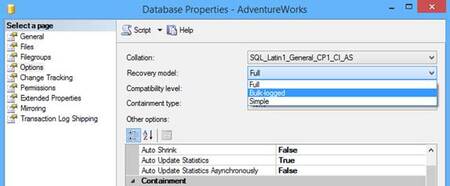
How to set using SQL Server Management Studio
- Right-click on the database name and select Properties
- Go to the Options page
- Under Recovery model select “Simple”
- Click “OK” to save
